The 3 Notion AI Systems that Cut My Work in Half
If you want to follow along or try these yourself, you can get Notion Business free for up to 3 months here.
If you've ever ended a workday feeling like you were busy but didn't actually move anything forward, this one's for you.
Here's something I've learned building systems for myself and others: a system is only as good as the person executing it. On a micro or small scale, that person is often you. You're the strategist, the creator, the operator, and the bottleneck.
You know that feeling when you sit down in the morning with a clear plan, but then you spend the first two hours: Updating trackers
Reviewing what happened last week
Rewriting the same kind of document you wrote three times already this month
And by the time you finally get to the creative or strategic work (the stuff that actually grows your business), you're already drained. So it gets pushed to "tomorrow." Again.
That's not a discipline thing. That's an energy thing. And I think a lot of us deal with it more than we'd like to admit.
My Structural Solutions
I started using Notion AI a while back to take to run some execution tasks for me that I didn’t have the brainpower to do so at that time. My first use of Notion AI was in 2024, and I actually didn’t recommend people paying for that version back then — but I tried it again last year when my brain was just overloaded.
It ended up handling a lot of the repetitive parts of my workflow:
Reviewing what happened across the workspace
Drafting structures and documents
Thinking out loud when I need to brainstorm or process ideas
That freed me up to actually do the work I care about.
If you’re in a creative field or any work that requires you to plug into that creativity, I highly recommend looking at Notion AI to free up the administrative load so you have more space for the creative.
Using Notion AI for Creative Work
Notion AI is one of my most used features of the Business plan, and today I'll walk you through three ways I use it (with Notion agents) that virtually cut my work in half.
As a preface, you would have to be subscribed to theNotion Business plan to implement any of these solutions into your workspace.
And as an additional note, my references here will be about my creator business (mostly to keep the privacy of my actual work) — but rest assured, these are also systems I use with my regular career. So whether you use Notion AI as a creator, consultant or specialist, I think you'll find something useful in here.
Weekly Reviews
Call it cliche but a weekly review is of the most underrated habits for anyone running their own workflow. Here's why I do it:
Clarity. It shows you where your time actually went versus where you thought it went.
Closed loops. It surfaces the things you started but forgot to finish. That half-written draft, that client email you never sent, that task you moved to "later" three weeks ago.
Better planning. When you know what last week actually looked like, your plans for next week get a lot more realistic.
The problem is that doing this manually is tedious. You have to dig through your pages, your databases, your task lists, and piece it all together yourself. Most weeks, that's enough friction to just skip it entirely.
Notion AI handles that compilation for you. You prompt it, it pulls together everything you've touched for the week, and you get a clear picture without digging through anything. Perfect for solo users (or simply forgetful and busy ones...like me).
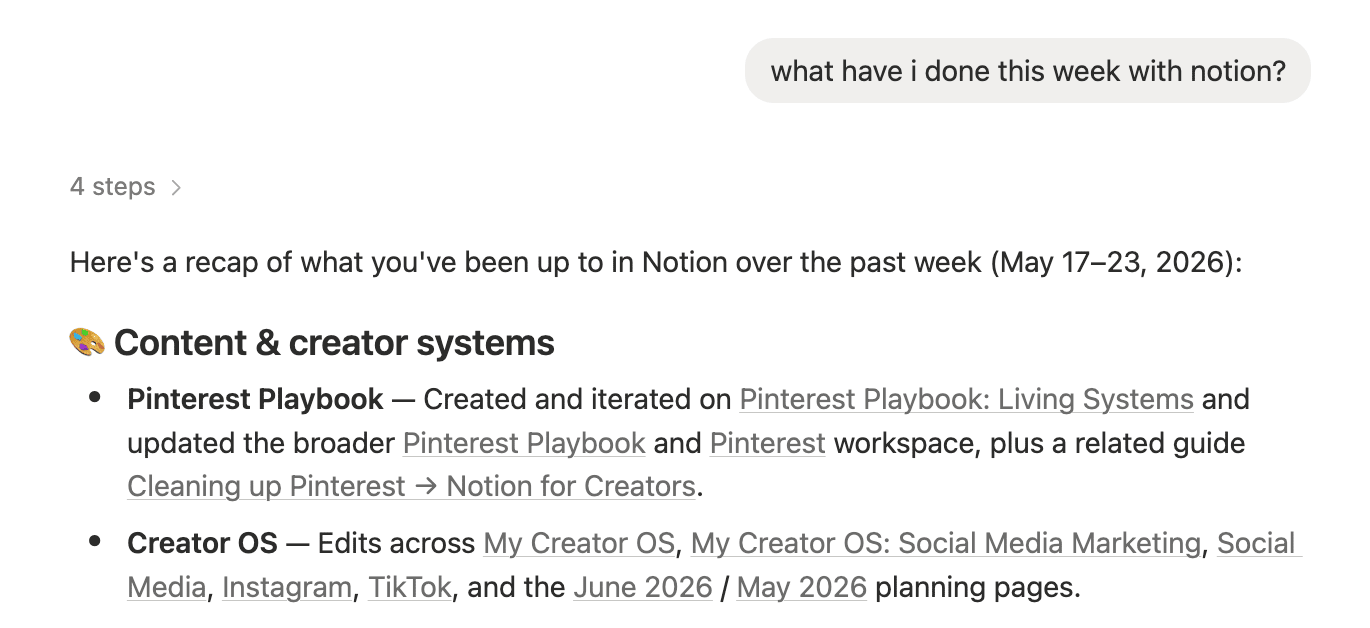
In Practice
When Notion AI reviews your actions for the week, it lists down the things that you've actually done. What's especially great for this is that it links you to said pages in case this triggers a memory of an unclosed loop in your workflow.
For creators: Imagine ending your week and instantly seeing that you drafted three newsletters, updated two product pages, but never got to that lead magnet you planned. That gap awareness alone can reshape your next week's priorities.
For consultants: Weekly reviews become even more powerful when you're juggling multiple client workspaces. You can prompt AI to surface every change across projects, giving you a bird's-eye view of progress without manually checking each client's board.
For teams and businesses: This turns into an accountability tool. Instead of relying on standups or status update meetings, anyone on the team can run a review to see what's been touched, by whom, and when. It's essentially a living changelog for your workspace.
And if you work with a team, this gets even more useful. You can quickly see how the workspace has been updated since you last looked at it. Who changed what. When. And yes, who accidentally deleted that one block you spent 20 minutes on.
Assisted Building
Most of the work we do follows some kind of repeatable structure:
A product launch has steps.
A content pipeline has stages.
A client onboarding has phases.
The problem is that we rebuild these structures from scratch every single time, even when the shape of the work is the same.
Assisted building is about letting AI handle that structural layer. You bring the expertise, the strategy, the decision-making. AI builds the scaffolding so you can focus on the parts that are actually unique to this project.
In Practice
For context, I recently started building a launch plan template...for my templates.

In the past, the process of doing this just lived in my head until execution time. But the past few weeks, I've actually started re-publishing some old templates.

I think of this as "scaffolded creation."
You know how it's always easier to edit a draft than to stare at a blank page? Same idea here.
You create a reusable structure that holds the shape of your process.
You fill in the parts that are actually unique to this project.
AI can generate that structure for you, so you're not even starting from a blank scaffold.
You're starting from something that already has shape, and you just make it yours.
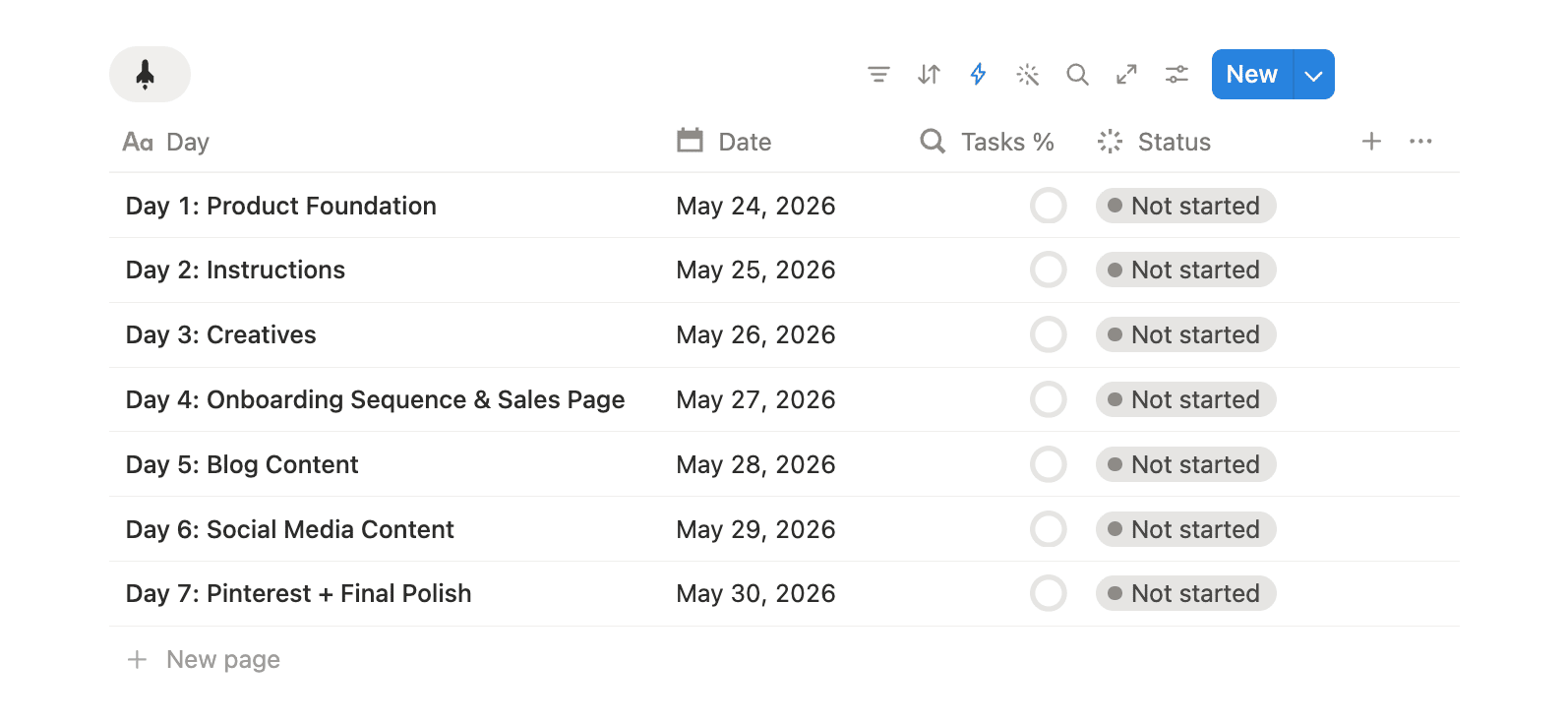
Current Structure of Template
The core of the idea and the structure I want to implement comes from my know-how and understanding of the frameworks and systems that I use, but the execution is where I share the workload. It's that thing where it's a lot easier to edit something (correction) than to start from scratch (creation.)
For creators: Think about how many times you've launched something and had to rebuild the same checklist, the same copy structure, the same asset list from scratch. You can set that up once and let AI adapt the framework each time. I went from spending half a day planning a template launch to wrapping it up in under two hours.
For consultants: This is where client deliverables stop eating your evenings. You have your methodology, your frameworks, your onboarding flows, your proposal structure. AI drafts it out based on what you've already built, and you customize per client. Same quality, a fraction of the time.
For businesses: Think SOPs, onboarding docs, internal wikis. All the stuff everyone knows should exist but nobody has time to write. AI drafts the structure from your existing documentation, and your team refines it from there. The knowledge gets captured instead of living in someone's head.
(As a side note, if you're interested in trying a 3-day lead magnet building sprint, comesign up for the waitlist.)
Brainstorming Partner
I am AI's biggest hater when it comes to anything creative. I don't like AI "art." I don't like blatant AI writing. That's a hard line for me. I do think AI usage exists in a spectrum, and it’s just the nature of technology acquisition and mixing technology with creatives.
We’ve seen this in the transition from traditional art to digital art. History may not always repeat itself, but it often rhymes.
As a thinking partner, here's how I actually use it:

Poking holes in my ideas. I'll pitch a concept, share my writing, and ask it to challenge me. Where's the weak spot? What am I not considering?
Asking me better questions. Sometimes I don't need an answer. I need the right question to get unstuck. What’s special about a product or an idea isn’t a trigger to a big external system, it’s often an inside job.
Pulling up evidence. If I have a hunch about something, AI can dig through my workspace or the internet for theoretical framework and either back it up or show me I'm wrong.
Now what makes Notion AI useful and preferred over the standard models is that it can play that thinking partner role with one major advantage: it already has context on my work. It's not giving you generic suggestions. It's pulling from the actual data, documents, and history inside your workspace.
Here's what that unlocks:
Relevance. Ideas are grounded in your real projects, your audience, your past decisions.
Pattern recognition. AI can spot gaps or themes across your work that you might miss when you're too close to it.
Low friction. You don't need to brief anyone or schedule a call. You just ask.
One thing I appreciate about this is that the Business plan already gives you access to AI models that would otherwise be a separate subscription. If you're someone who mainly uses AI for thinking and writing (no coding or image generation), it's a nice bonus that's already baked into what you're paying for.
In Practice
A concrete way I took advantage of this function by building a work log. In this work log, I would manually document all that I’ve done and then query this database about the progress and potential gaps I might've missed in the execution.

I've stopped this practice because I've developed my systems to a level that I don't need to meticulously document it. But if anyone asks how I polished this creator brand into what it is today: from its systems, marketing, and operations — I’d point out this process as a crucial aspect of that.
For creators: Imagine asking for your next 10 content ideas and getting suggestions that actually reference your content pillars, flag topics you haven't covered in a while, and pull from your best-performing posts. You're brainstorming with your own data instead of starting from vibes.
For consultants: Picture pulling up a client's project database and asking AI to spot bottlenecks or draft a quarterly review. Because it has access to that client's actual data, the output is specific to their situation. No translating generic advice into something usable.
For businesses: Think about what quarterly planning looks like when AI can reference your OKRs, your team's capacity, and your past retrospectives all at once. Everyone walks in with context instead of spending the first hour getting aligned.
The Common Thread
If there's one takeaway from all three of these, it's this: the better your systems are set up, the more AI can do with them.
All three work for the same reason:
Weekly reviews work because your work already lives in Notion. AI has something to look back on.
Assisted building works because your processes already have a repeatable shape. AI has something to build from.
Brainstorming works because your data, your content, and your history are already organized in one place. AI has something to think with.
The foundation is yours. AI just makes it work harder for you. And I think that's the part a lot of people get backwards. They expect AI to fix a messy workflow. But the real payoff comes when your systems are already solid and AI steps in to operate them.
So if you're think
ing about trying any of this, here's where I'd start:
Get your workspace in order first. If your databases are scattered and your pages are all over the place, AI won't magically organize them for you. Build the structure. Then bring AI in.
Start with one use case. Don't try to automate everything at once. Pick the one task that drains you the most and experiment there.
Treat AI as a collaborator. The best results I've gotten are when I stay in the driver's seat and let AI handle the legwork.
The goal isn't to hand everything off. It's to protect your energy for the work that actually requires you.
P.S.
Are you a startup or a founder?
Try out Notion Business for up to three months (that's up to $12,000 of savings) with my affiliate link.