How to Post Consistently Without Burning Out
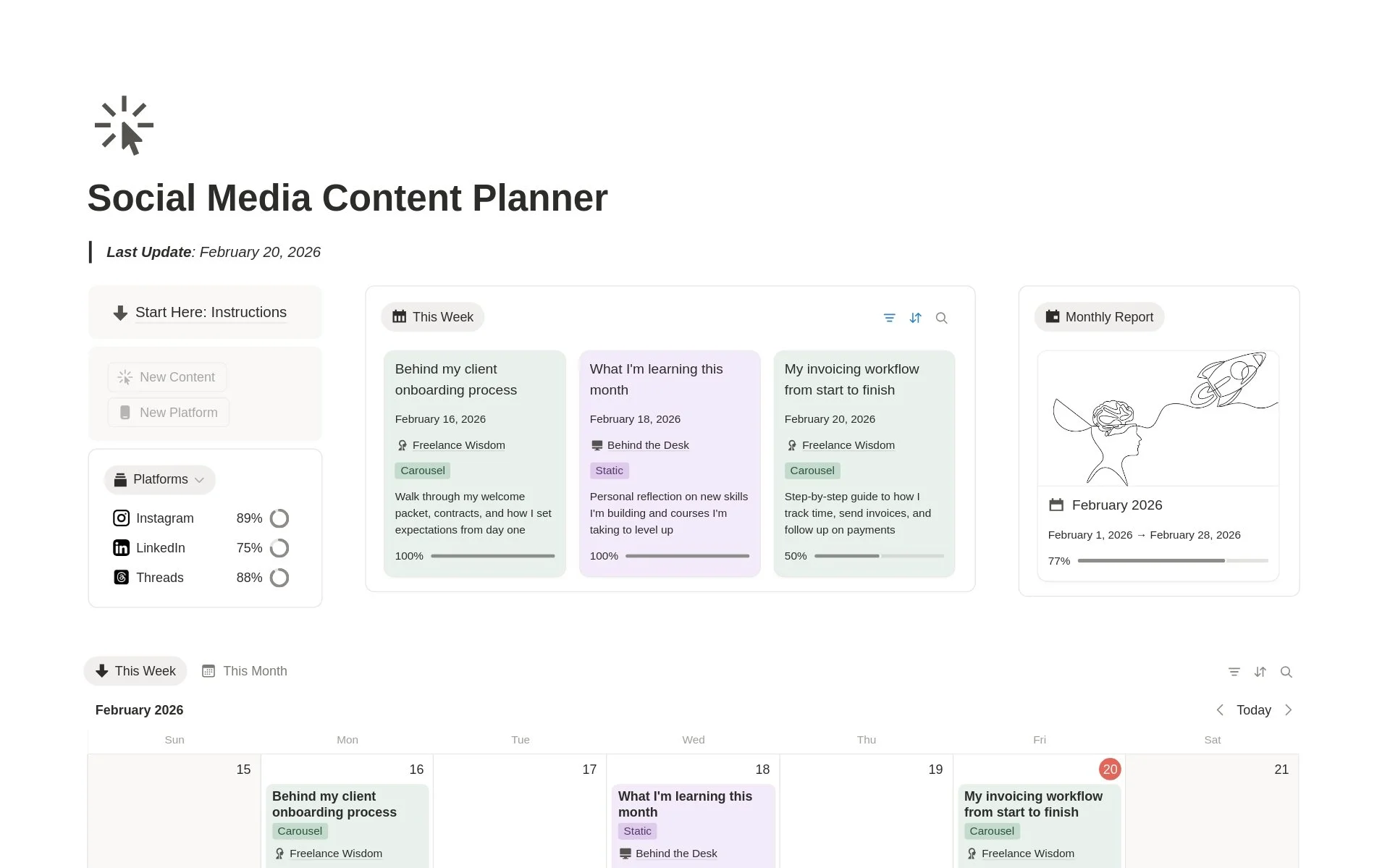
I’ve been doing social media with Notion for three years now and this is the base template that I use for all my content planning. I tweak things a lot based on what we need for the marketing strategy so there’s not much specificity when it comes to the platform or content buildup.
Since the needs for content often changes at work. Somtimes, we have brand partnerships. Sometimes, we have specific campaigns. So this template changes based on what we’re prioritizing for our marketing needs.
Treat this like a sandbox. No part of this template is set in stone. Customize and rebuild as you would like. If you need further guidance, you can reach out to me for questions or consultancy if you want more in-depth guidance.
Step 1.
Identify Platforms
Let’s start with intentionality. What type of posts will you be posting, and which platforms offer you that format? Short-form performs well in TikTok, Instagram, and YouTube shorts — but it’s not the best platform for more text-based ones like Threads or X.
My advice is to focus on 2–3 platforms where your audience actually hangs out. Ideally, pick something short-form and long-form in the same format. So as a sample:
Videos: Short-form is YouTube Shorts, Instagram, TikTok — and long-form is YouTube or some paywalled platform I’m not so familiar with (long-form video usually has a pyawall.)
Text: Short-form is Threads or X — and long-form can be Medium, Substack, a personal blog, or more recently — X as well.
More isn't always better, it's about showing up consistently where it counts.
Identify a Purpose
Identify a purpose for each social platform to keep things lean. One of the biggest mistakes people often make is that they have too many platforms that serve the same purpose. In my opinion, it’s okay to show up on both Instagram and TikTok with the same content but make sure that the effort you put into it justifies the benefit of the investment.
If you’re posting on both and tweaking the posts every time while getting under 100 views, I’d honestly just advice to focus on one and then bridging to another platform once you get the first few thousand views.
For my work, we utilize TikTok for the potential virality but we get clients from Instagram.
So we’ve started our social media presence with setting the cadence on Instagram, then just slowly adapting that same content to TikTok — and now, we’re doing YouTube Shorts. Let the process slowly evolve with time. The goal is longevity, not sudden virality. Most of the people you’re growing with right now won’t be there in 1-2 years.
Step 2.
Set Report Periods
Choose the time periods you want your social media reports to cover.
Most people prefer doing this monthly. I personally use a monthly breakdown, by industry standard, but you can set this template to match your own pace. Maybe you prefer a quarterly review, weekly reviews, or every other month. Once again, this is your sandbox.
Find your own pace so that you don’t burn out because burnout is so easy to come around here unfortunately.
Step 3.
Define Content Pillars
This is the cornerstone of content building.
Identify the main themes or focus areas that guide your social media content.
In the dashboard itself, you can add a short description and a few examples for each pillar so you always have a clear reference when planning new posts. This helps keep your content consistent, intentional, and aligned with your overall goals.
What are content pillars?
Content pillars are the main themes or categories that guide everything you post on social media.
They act like the foundation of your content strategy. Each pillar represents a core topic you consistently talk about because it connects to your brand, goals, and audience interests.
Think of them as “content lanes” that keep you focused and intentional. For example:
A fitness coach might have pillars like Workout Tips, Nutrition, and Mindset.
A lifestyle creator might focus on Routines, Reflections, and Exploration.
A business account might use Education, Testimonials, and Behind the Scenes.
Each pillar ensures your content stays balanced and recognizable while giving you flexibility within a clear structure.
There are many ways to approach content pillars. The way I like to approach them is more in formats related to effort. If you’ve seen my content in Instagram, where this is most apparent, I generally have three types of content:
Low Effort, High Reach Posts. These are posts that I’ve seen gain traction. I used to post these a lot because it gave me a lot of reach, but over time, it’s really just the equivalent of empty calories for content planning. Once you get a certain momentum going, I’d advise to post less of these. My version of these are reels with quotes I’ve posted on Threads or those one-liners.
Mid Effort, Wild Cards. These are posts that aren’t too difficult to build, not not quite easy either. These are often my one-pagers, simpler carousels, or preview-style pages. In Threads, I consider these full page screenshots as mid effort because I style them to look good with sample data. In a perfect world, these posts would always have that reach.
High Effort, High Retention Posts. These are posts that take time to build, but would likely be saved or browsed by a user with the intent to repurchase. Here are a couple of samples: Recreational Essay Writing, Social Media Content Planner, Resume Builder, Analytics Builder.
Just a caveat as well though, I don’t post as often on Instagram because I don’t see much value in consistency in that platform, at least not on grid. My goal was just to build that initial spread, and now I just do some form of maintenance by posting on stories and responding to inquiries in that platform. Usually, people on Threads will reach out on Instagram.
Step 4.
Build Content
With all that’s said and done, it’s time to start creating your content based on the Content Pillars you defined earlier.
Each post should connect to one of your pillars so your overall feed feels consistent and intentional. Try to balance them out — for example, one post might focus on education or insights, while another leans into storytelling or behind-the-scenes moments.
You can also tag your posts with platform, goal, or content type (like Reel, Carousel, or Story) to make filtering easier later. The goal here is to create a simple but repeatable workflow where your ideas, posts, and performance are all connected.
My content creation process isn’t a straightforward step-by-step instructional guide but once again, categorizing common ideas:
Generalist, High Reach Content. Something with high TAM (total accessible market) — this can be something about productivity, growth, or self-development. I tried doing this for some period of time, but it just didn’t work out. I would recommend doing these posts if you’re initially trying to build that momentum, but like I said — empty calories.
Educational, Specialized Content. I don’t usually do this because I’m not positioned as an educator like most consultants are. But when I do, I discuss a certain area of Notion that I use frequently and infuse ideas, insights and concepts I've come across. I think the big mistake of a lot of people is thinking an LLM-generated script is enough. That will get you reach, maybe, but it’s rare that I’ve seen it work for conversion or trust. It also just pushes you away from the joys of creations.
Conversion-focused Ideas. These would be my step-by-step posts on how to use specific templates linked to fulfilling a certain task that the template is designed for. Essentially, this is how I show people how achieve their goal of choice through my template.
Spin this how you would like. Third time, saying it: but this template is your sandbox. Go forth and build your social media presence. If you could as well, please send me your workspace. I always love seeing how people customize these templates.
If you also found this guide or the template useful, please leave a review on Notion!